Freight Network Intelligence

Know Which Lanes Fit
Before You Bid

LaneFlo helps carriers, brokers, and 3PLs analyze RFP lanes against their real network — so they know what to bid, what to price high, where to procure capacity, and what to avoid.

LAXCHI$2.45 3.2%ATLDFW$1.89 1.1%CHINJ$2.12 0.8%DALATL$1.76 2.4%SEALAX$2.31 1.5%MIAATL$1.94 0.6%PHXDEN$2.08 2.1%NJCHI$1.98 1.8%MEMDAL$1.67 0.4%CHILAX$2.53 1.9%ATLMIA$1.82 0.3%DENSEA$2.19 2.7%LAXCHI$2.45 3.2%ATLDFW$1.89 1.1%CHINJ$2.12 0.8%DALATL$1.76 2.4%SEALAX$2.31 1.5%MIAATL$1.94 0.6%PHXDEN$2.08 2.1%NJCHI$1.98 1.8%MEMDAL$1.67 0.4%CHILAX$2.53 1.9%ATLMIA$1.82 0.3%DENSEA$2.19 2.7%

The Problem

Winning bad freight is expensive.

Most teams can pull a market rate.

That is not the hard part.

The hard part is knowing whether the freight actually fits your network before you submit the bid.

A lane can look profitable in a spreadsheet and still create deadhead, weak coverage, one-way freight, service problems, and margin compression after award.

LaneFlo shows the network fit before you commit.

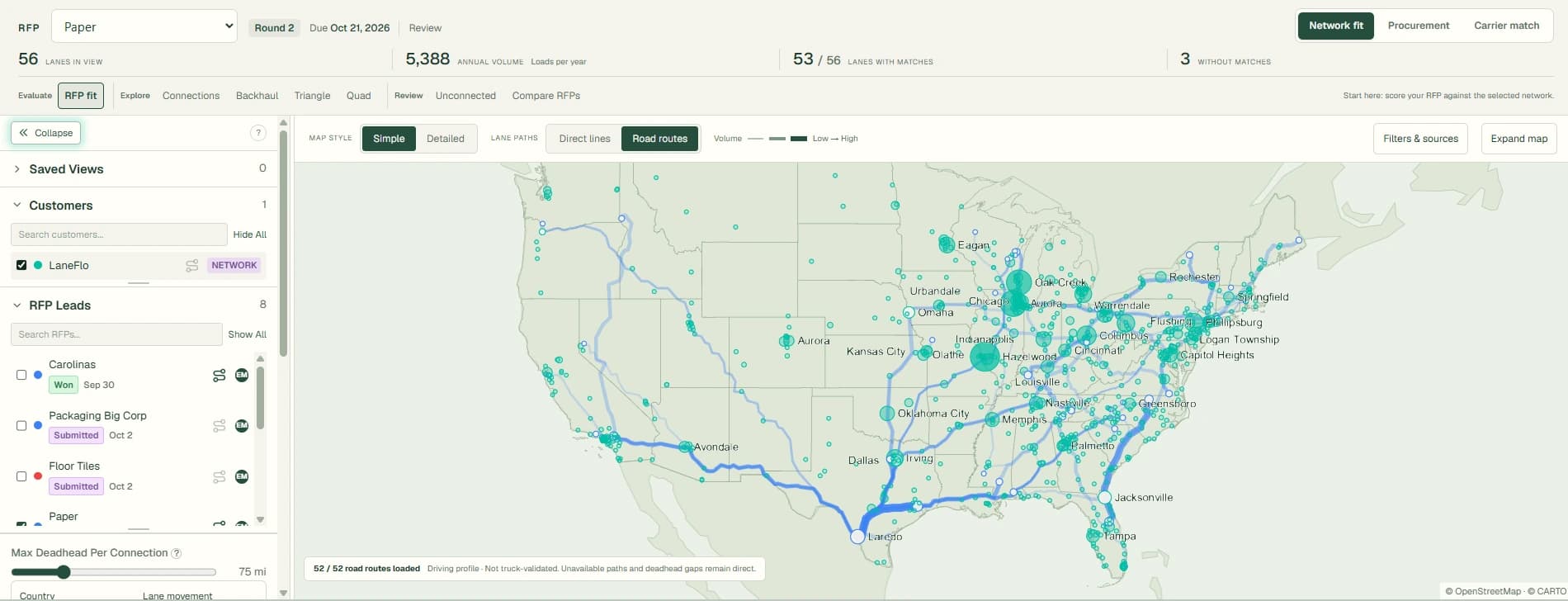
See which lanes connect to freight you already move

Find backhauls and triangles hiding in the data

Know which lanes need more procurement

Price high or walk away — with the data to back it up

Stop bidding blind.
Know the fit before you win the freight.

Market rates tell you what a lane costs. LaneFlo tells you whether the lane belongs in your network.

Built for Both Sides of Freight

Built for Asset Carriers, Brokerages, and 3PLs

For Asset Carriers

Protect your network before you win the freight.

See which shipper lanes complement your existing freight, create backhauls, or help reduce empty miles. Price aggressively where the freight fits, and avoid lanes that create imbalance.

  • See which shipper lanes fit your existing freight
  • Identify backhaul and triangle opportunities
  • Spot lanes that create deadhead or imbalance
  • Bid aggressively where you have a structural advantage
  • Avoid winning freight that weakens the network

For 3PLs & Brokerages

Build the bid around real capacity — not hope.

Compare customer lanes against carrier preferences, known capacity, and coverage gaps. Find carriers that already want the freight, then build better bids around real network fit.

  • Match customer lanes to carriers already running those markets
  • Find procurement gaps before the RFP is due
  • Build carrier-specific opportunities around lane fit
  • Discover backhauls and triangles across customer networks
  • Give sales a better answer than "we can cover it"

The Platform

Explore the tools

Match carriers to your lanes instantly

Upload your lane file and instantly see which carriers already move freight in your corridors. Coverage heatmaps, match scores, and partner density — all surfaced automatically so you never bid blind.

  • See carrier coverage heatmaps by region and lane
  • Match scores based on network overlap and deadhead
  • Identify partner density before you pick up the phone
Match carriers to your lanes instantly

The Shift

Stop guessing. Start seeing your network.

Upload a lane file and instantly see fit scores, network matches, and bid recommendations overlaid on every row.

carrier_lanes_export.csv8 rows
#OriginDestMilesWkly VolRate/Mi
1ATLDFW78148$2.14
2CHILAX2,01524$1.87
3MIANJ1,28136$2.31
4SEAPHX1,41812$1.62
5DENCHI1,00360$1.95
6DALMEM45332$2.48
7CLTBOS85118$1.93
8INDATL53354$2.07
RFP: LaneFlo8 LanesAvg Fit: 70
3212
LaneMilesVolFitBest DHPartnersRec
ATL → DFW781489212 mi
JB HuntSchneider
Bid Aggressive
CHI → LAX2,015247445 mi
Werner
Bid Normal
MIA → NJ1,2813661Price High
SEA → PHX1,4181238120 miAvoid
DEN → CHI1,00360858 mi
XPOEcho
Bid Aggressive
DAL → MEM453327922 mi
Heartland
Bid Normal
CLT → BOS851184495 miAvoid
IND → ATL533548815 mi
JB HuntODFL
Bid Aggressive
Your SpreadsheetLaneFlo Analysis
Fit Scores

Know which lanes belong in your network

Network Matches

See backhaul, triangle, and quad opportunities

Bid Recommendations

Bid aggressive, price high, or walk away

What It Finds

Turn lane files into
network opportunities

Network Fit

Score every lane before you bid

Each RFP lane gets a fit score based on deadhead risk, carrier coverage, backhaul potential, and network density — so you commit to the right freight with conviction.

  • Fit score combines deadhead, backhaul, and carrier coverage
  • Identify coverage gaps and uncovered markets instantly
  • Rank entire RFPs by network value in seconds
RFP: Acme Logistics5 LanesAvg Fit: 70
2 Bid Aggressive1 Bid Normal1 Price High1 Avoid
LaneMilesVolFitBest DHPartnersRec
ATL → DFW781489212 mi
JB HuntSchneider
Bid Aggressive
CHI → LAX2,015247445 mi
Werner
Bid Normal
MIA → NJ1,2813661Price High
SEA → PHX1,4181238120 miAvoid
DEN → CHI1,00360858 mi
XPOEcho
Bid Aggressive
OutboundDAL CHI781 mi48 loads/wk

Backhaul Matches

CHI FTW
820 mi8 mi DH36 loads94 fit
CHI DAL
917 mi0 mi DH22 loads87 fit
Best Fit: 948 mi Deadhead36 loads/wk

+ 2 more matches below threshold

Route Opportunities

Find backhauls, triangles, and quads hiding in your network

Surface return loads, three-leg circuits, and four-stop loops that keep equipment loaded — ranked by fit, deadhead, and volume across your entire lane file.

  • Match outbound lanes to return-load opportunities automatically
  • Build 3- and 4-leg continuous circuits from your data
  • Reduce empty miles and unlock hidden network value

Bid Strategy

Know what to bid aggressively and what to avoid

Turn lane scores into a bid strategy. See which lanes to pursue hard, which to price defensively, and which bundles deliver the best combined network value.

  • Strategy breakdown: how many lanes to bid aggressive vs. avoid
  • Auto-bundle lanes into circuits for stronger bids
  • Recommended bundles with combined fit scores
Bid Strategy52 lanes scored

Recommendations

18

Bid Aggressive

24

Bid Normal

7

Price High

3

Avoid

Top Bundle

Midwest Circuit91 fit
1DAL CHI781 mi
2CHI DET281 mi
3DET DAL1198 mi
2,260 total miBid Aggressive

How It Works

From lane file to bid strategy

01

Upload the RFP

Drop your customer RFP or lane file. CSV, Excel — columns auto-map.

02

Add your real network

Import carrier preferences, asset lanes, historical loads, or committed freight.

03

Score every lane

Each lane gets a fit score based on network density, balance, and history.

04

Find the connections

Backhauls, triangles, and coverage gaps surfaced automatically.

05

Build the bid

Bid aggressive where you fit, price high where you don't, skip the rest.

Full Lifecycle

Beyond the bid

Excel & PDF Export

Multi-sheet Excel with final RFP + notes. PDF summaries. CSV for any view.

RFP Version Compare

See lanes added, dropped, and unchanged between RFP rounds.

Team Collaboration

Per-lane comments, lead claiming, role-based permissions. Everyone works from one source of truth.

Bid Rate Tracking

Set and track bid rates per lane with auto-save. See coverage gaps before you submit.

FMCSA Authority Lookup

Pull carrier authority status and safety scores directly into your workflow.

Audit Trail

Every action logged — uploads, edits, exports, team changes. Built for compliance.

Who Uses It

How each team uses LaneFlo

Sales

Qualify opportunities before chasing them.

Upload RFPs or lane lists and see whether the opportunity fits your actual network before committing resources.

  • Should we pursue this RFP?
  • Which lanes should we push hardest?
  • Which customers fit our network best?
  • Which lanes can we cross-sell into existing freight?

Pricing

Price based on network fit, not just market rate.

See where you have backhaul coverage, carrier density, and route combinations that let you sharpen or protect your rates.

  • Which lanes can we price sharper?
  • Which lanes need a premium?
  • Which lanes create imbalance?
  • Which lanes should be bundled together?

Procurement

Source carriers around real lane opportunities.

See where carrier capacity already fits, where gaps exist, and which carriers should be targeted for the freight you need covered.

  • Which carriers match this RFP?
  • Where do we need more coverage?
  • Which carriers have backhauls into our freight?
  • Which customer lanes create opportunities for our carriers?

Leadership

See the network before committing to the freight.

Get a higher-level view of customer fit, coverage density, and risk exposure across the network.

  • Does this RFP strengthen the network?
  • Are we overexposed in bad markets?
  • Which customers create the best network value?
  • Where should we grow carrier capacity?

Frequently Asked Questions

Everything you need to know about LaneFlo.

LaneFlo is a freight network intelligence platform that helps brokers and carriers visualize how their lanes connect. Upload your lane data and instantly see backhaul opportunities, triangle and quad routes, RFP fit scores, and network coverage gaps.

LaneFlo is designed for freight brokers managing shipper lane networks and carriers looking to optimize asset utilization. Whether you run 5 trucks or 500, the platform surfaces hidden efficiencies in your existing lane data.

All you need is a CSV with origin/destination city-state pairs (or ZIP codes). Rate, volume, and equipment type columns are optional but unlock richer scoring. We provide a template to make formatting easy.

LaneFlo scores lanes based on geographic proximity, directional alignment, volume compatibility, and network density. Each backhaul, triangle, or quad opportunity gets a composite score from 0-100 so you can prioritize the highest-value matches.

A backhaul is a return load that reduces deadhead miles. A triangle route chains 3 lanes into a continuous loop (A→B→C→A). A quad route chains 4 lanes similarly. LaneFlo automatically detects all three across your entire network.

Yes. All data is encrypted in transit (TLS 1.3) and at rest (AES-256). Lane data is isolated per team with row-level security. We never share your data with other users or third parties.

Absolutely. Join the waitlist to get early access with a free trial period. You can upload your lanes, run the full analysis, and see results before any payment is required.

Yes. Each RFP gets its own pipeline view with status tracking, deadlines, bid coverage, per-lane notes, contact management, and lead assignment. You can track an RFP from first upload through final bid submission.

LaneFlo exports multi-sheet Excel workbooks (final RFP lanes + notes), PDF summaries, and CSV files. Export permissions are controlled per team member by admins.

Yes. Teams get role-based access (owner, admin, member), per-lane commenting, lead claiming, and a full audit trail. Every action — uploads, edits, exports, permission changes — is logged for compliance.

Get Started

Ready to stop bidding blind?

Upload a lane file, add your network, and see which lanes fit before you submit the bid.